RevOps + GTM Case Study

The brand isn't the deal.

How I helped Vantage TV*, a performance-television advertising company, replace a tangle of agency and brand relationships with one connected, self‑running source of truth in HubSpot.

Shane Winter Β· RevOps + GTM Engineer HubSpot Β· Salesforce Β· Clay shane@winterrevops.com

* Client name and identifying details have been changed to protect confidentiality. Figures are representative of the engagement.

02 Β· The problem

In HubSpot, a deal belongs to one company, but every Vantage deal belonged to two.

One agency hires you to run campaigns for several different brands. The agency pays; each brand runs its own campaign. But a HubSpot deal points to only one company, so every deal had to pick a side: the agency and lose the brand, or the brand and lose the agency. Either way, half the picture disappeared.
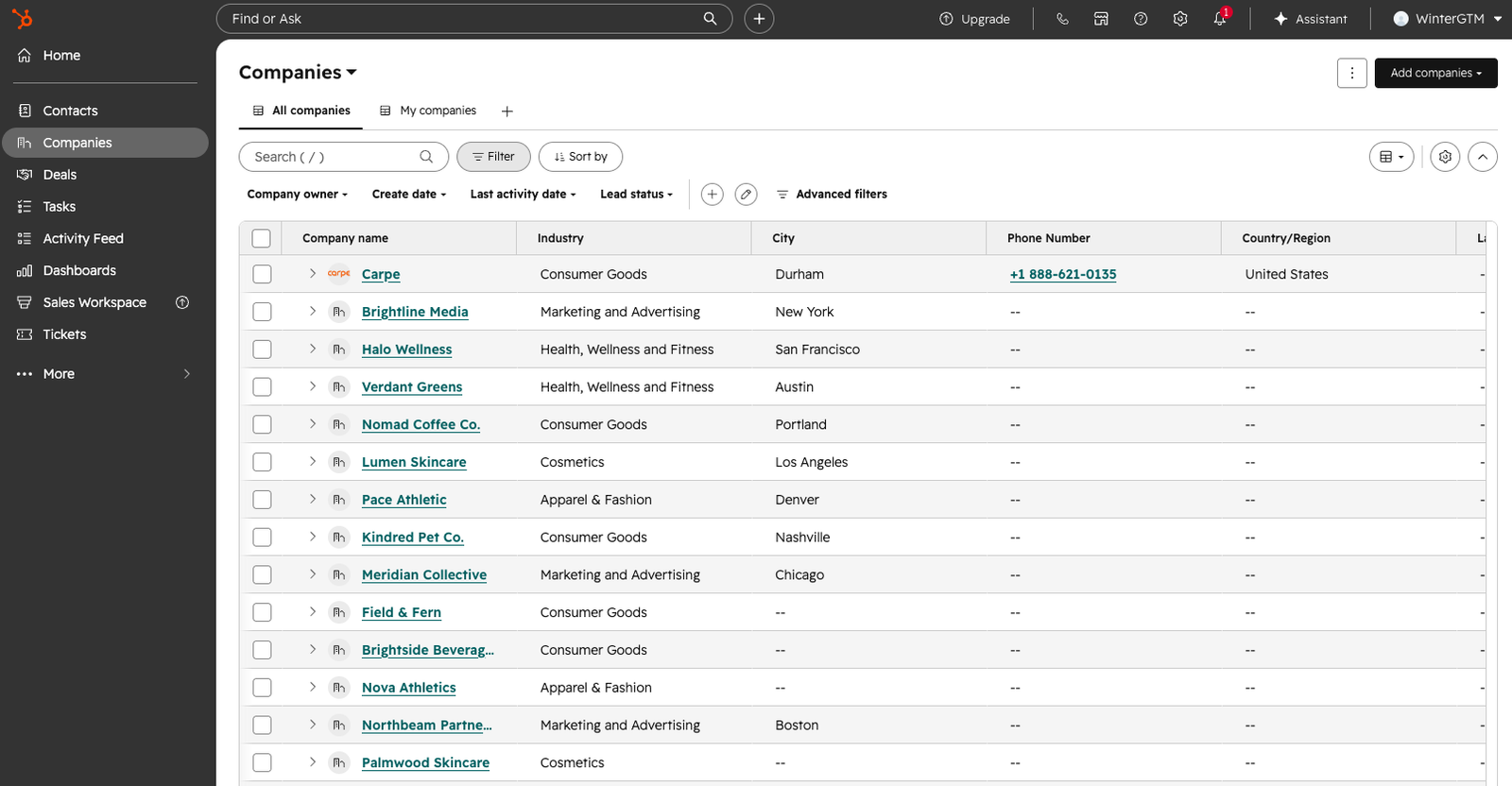
The companies list before the rebuild: ~30 accounts in one flat list, agencies and brands indistinguishable, no segmentation or relationships.
Save as assets/before-companies.png
Every account in one flat list, agencies and brands indistinguishable.
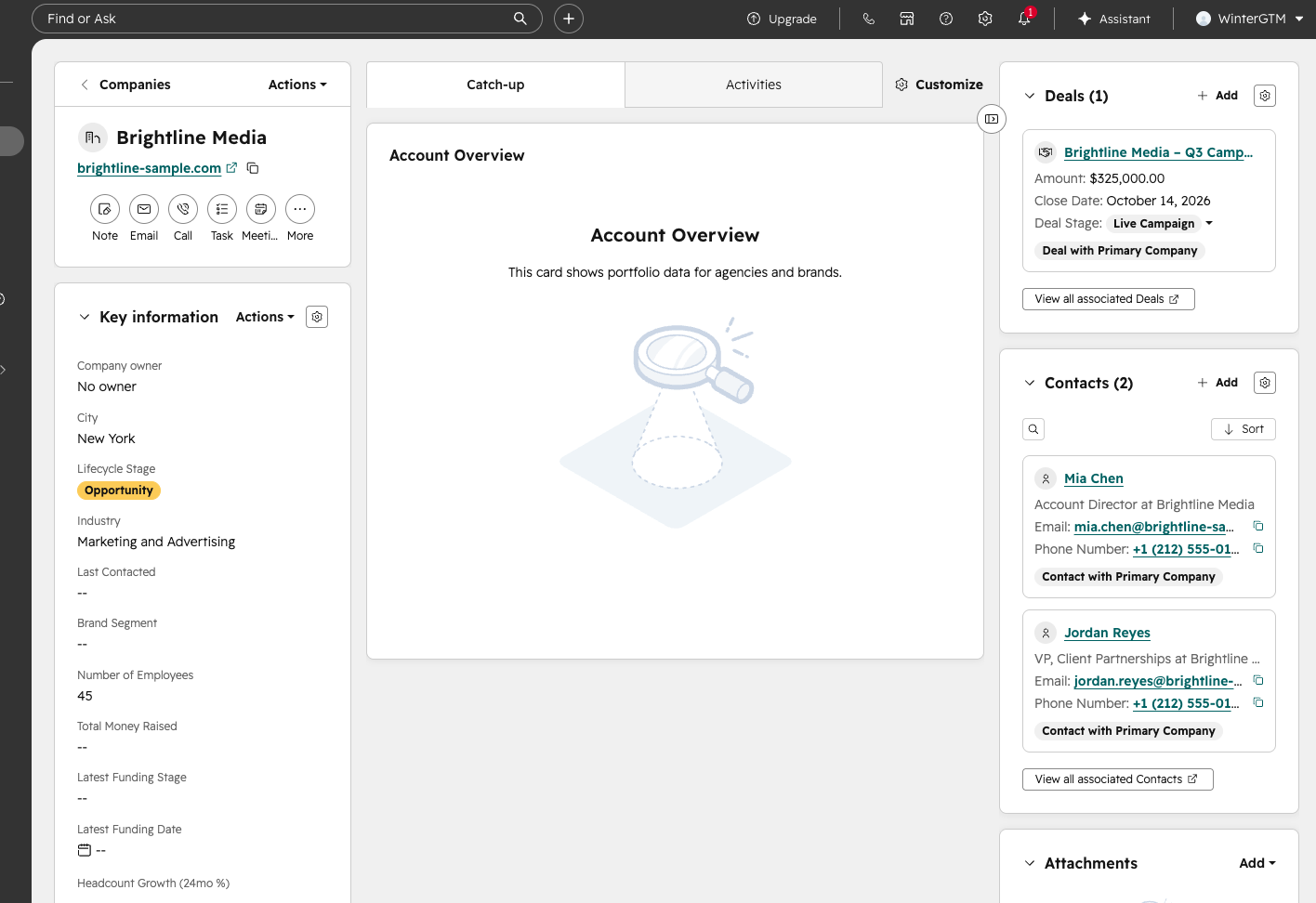
An agency record before the rebuild: Brand Segment blank, no linked brands, the Account Overview card empty. The record tells you nothing about the portfolio.
Save as assets/before-record.png
Open an agency and it told you nothing: no type, no linked brands, no portfolio.
03 Β· The reframe

I split "the deal" into the four jobs it was really doing, then connected them.

Each job gets its own record type. Linked together, they finally answer what one deal never could: an agency's full book of business, and every brand's campaign underneath it.

The sale β†’ a Deal
Who's paying, and how much. One deal on the agency that pays: amount, stage, forecast, and nothing else.
The relationship β†’ Companies
Who represents whom. Each brand is linked under its agency, or flagged as a direct client.
The campaign β†’ a Ticket
The actual work. One ticket per brand, moving through its own delivery stages as it runs.
The money β†’ Rollups
Earned vs. owed. Booked βˆ’ Invoiced = Backlog, recognized as the campaign delivers and rolled up per brand and agency.
How I built it

Each job maps to a native HubSpot primitive: the sale to a Deal, the relationship to parent/child Company associations, the campaign to a Ticket, the money to Python rollups. I deliberately stay away from custom objects, doing as much as possible within the boundaries of the client's existing tier pricing.

04 Β· Typed relationships

Direct or agency-managed, never a guess.

Every brand is tagged Direct or Agency-Managed automatically, with its managing agency, campaign status, and revenue sitting on the record as real, sortable fields instead of tribal knowledge.

How I built it

Added custom company properties brand_relationship, managing_agency and managing_agency_id, then wrote a Python script () that walks each brand's parent-agency association and stamps all three onto the record. Two saved views filter on the field, so "show me every agency-managed brand" is one click, not a spreadsheet.
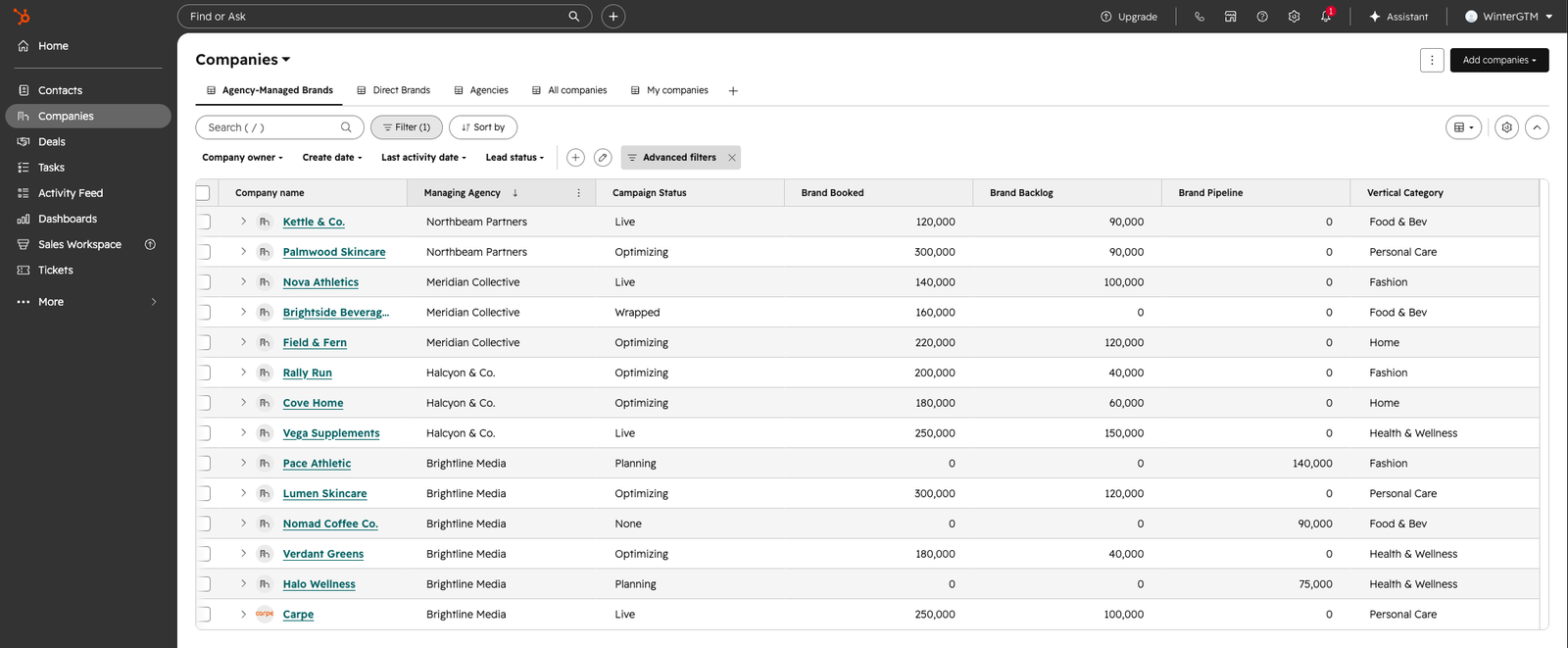
A brands list filtered to agency-managed, showing a Managing Agency column, campaign status, and per-brand booked/backlog/pipeline.
Save as assets/segments.png
Brands split by relationship, each showing its managing agency and numbers.
05 Β· The commercial layer

Deals are the sale, and only the sale.

One number the team works day to day: no campaign noise, no delivery status. Just who's paying, how much, and an honest forecast.

How I built it

The 8 stages came out of planning meetings and interviews I ran with the sales team, not a template. I built the pipeline (Discovery β†’ Live Campaign) with required-stage progression, tied each close date to its revenue-recognition date so the forecast stays honest, and saved Closing Soon / Booked / Stale cuts on top.
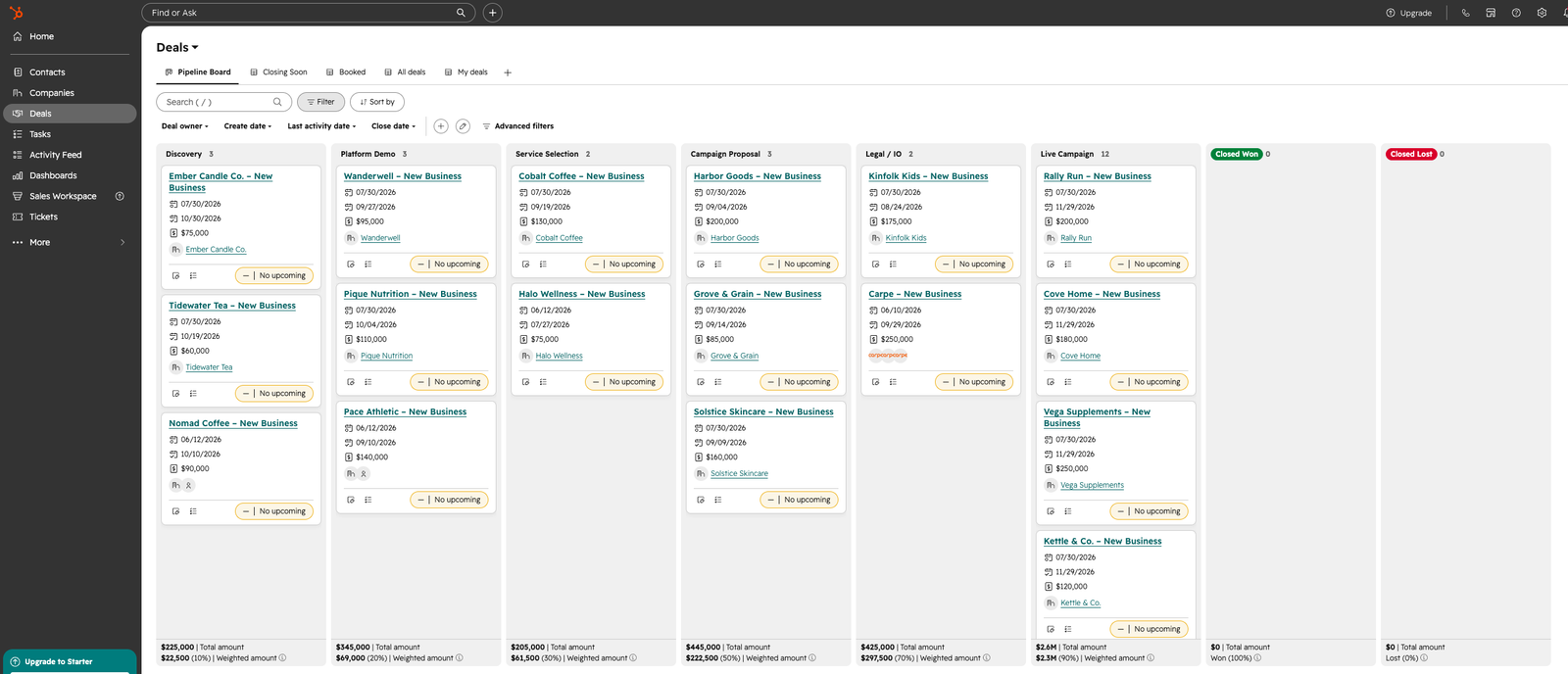
The deals pipeline board (kanban) with deals distributed across stages from Discovery to Live Campaign.
Save as assets/commercial-layer.png
The deal pipeline: the commercial layer, kept separate from delivery.
06 Β· The delivery layer

Tickets, repurposed as a campaign-delivery board.

Each brand's campaign runs on its own board (planned, trafficked, live, optimized, wrapped), so delivery status never contaminates the sale.

How I built it

A campaign has a different lifecycle from a sale, so tracking it in Deals would pollute the sales forecast. Tickets are HubSpot's native object for operational, status-tracked work, so rather than a custom Campaign object I repurposed the standard Tickets object into a 5-stage delivery board, with custom flight-date and media-spend fields, tracked per brand and fully separate from the deal.
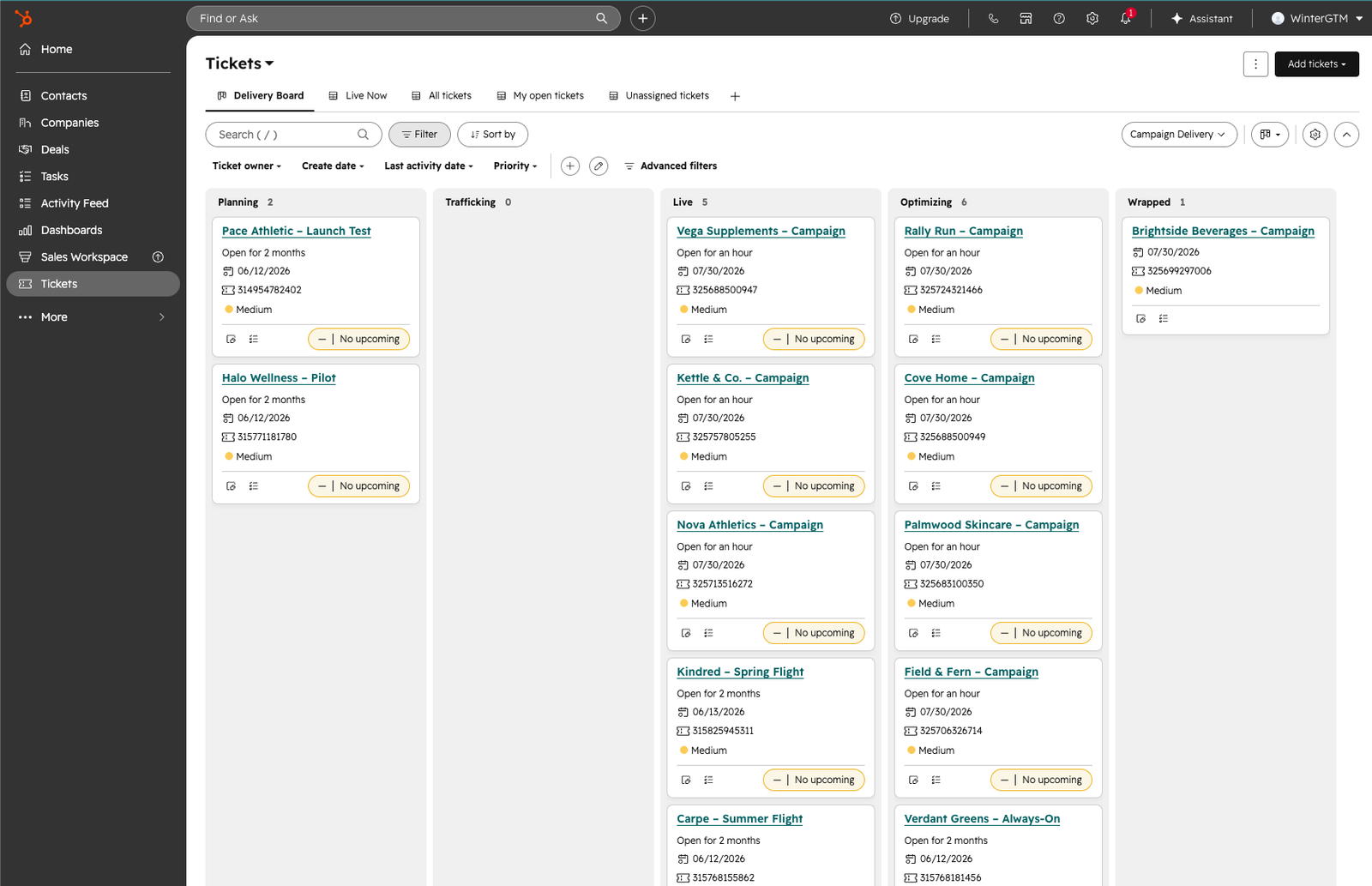
The Campaign Delivery board (kanban) with brand campaigns across Planning, Live, and Optimizing stages.
Save as assets/delivery-board.png
Campaign delivery: the work, tracked per brand, independent of the deal.
07 Β· The custom schema

The vocabulary the business actually uses.

Off-the-shelf, HubSpot has no field for a "flight date" or a "TV creative." So I gave it their language, as structured, reportable fields instead of free-text notes.

  • Deals: Service Type, Engagement Type, Primary KPI, Target Geography, Has TV Creative, Invoiced to Date.
  • Companies: Brand Segment, Vertical, plus rollup fields: booked, backlog, campaign status, managing agency.
  • Campaigns: flight dates, media spend, KPI, geography.
How I built it

Created 30+ custom properties across Deals, Companies, and Tickets through the CRM API (scripted with a service-account token, since the CLI's user token can't write schema). Each is a typed field, dropdowns and numbers rather than free text, so the data stays clean and everything downstream (cards, views, rollups) reads from it.
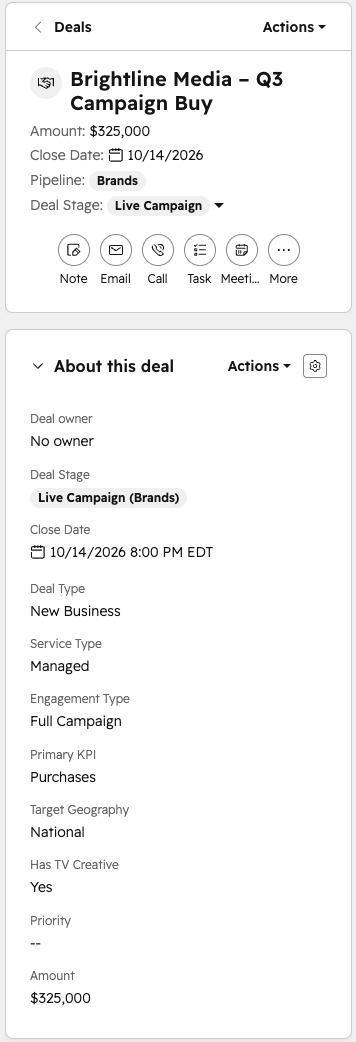
A deal record showing the custom deal properties: Service Type, Engagement Type, Primary KPI, Target Geography, Has TV Creative, Invoiced to Date.
Save as assets/deal-record.png
A deal record showing the custom fields
Custom properties across deals, companies, and campaigns.
08 Β· Custom development

A React app, running inside HubSpot.

  • Custom UI extension cards built with @hubspot/ui-extensions.
  • Deployed as a private app via the HubSpot projects CLI.
  • Reads live CRM data and renders native, on-record UI (no iframe hacks).
card entry point Β·
// One card that reads the record type and renders
// itself differently on an agency vs a brand.
hubspot.extend(({ actions }) =>
  <AccountOverview
    fetch={actions.fetchCrmObjectProperties} />
);

const p = await fetch(['brand_segment', …]);

if (p.brand_segment === 'agency')
  return <BrandPortfolio />;   // rollup
if (p.brand_segment === 'brand')
  return <BrandSnapshot />;    // its own
09 Β· The Account Overview card

One card, two faces: agency rollup, or brand snapshot.

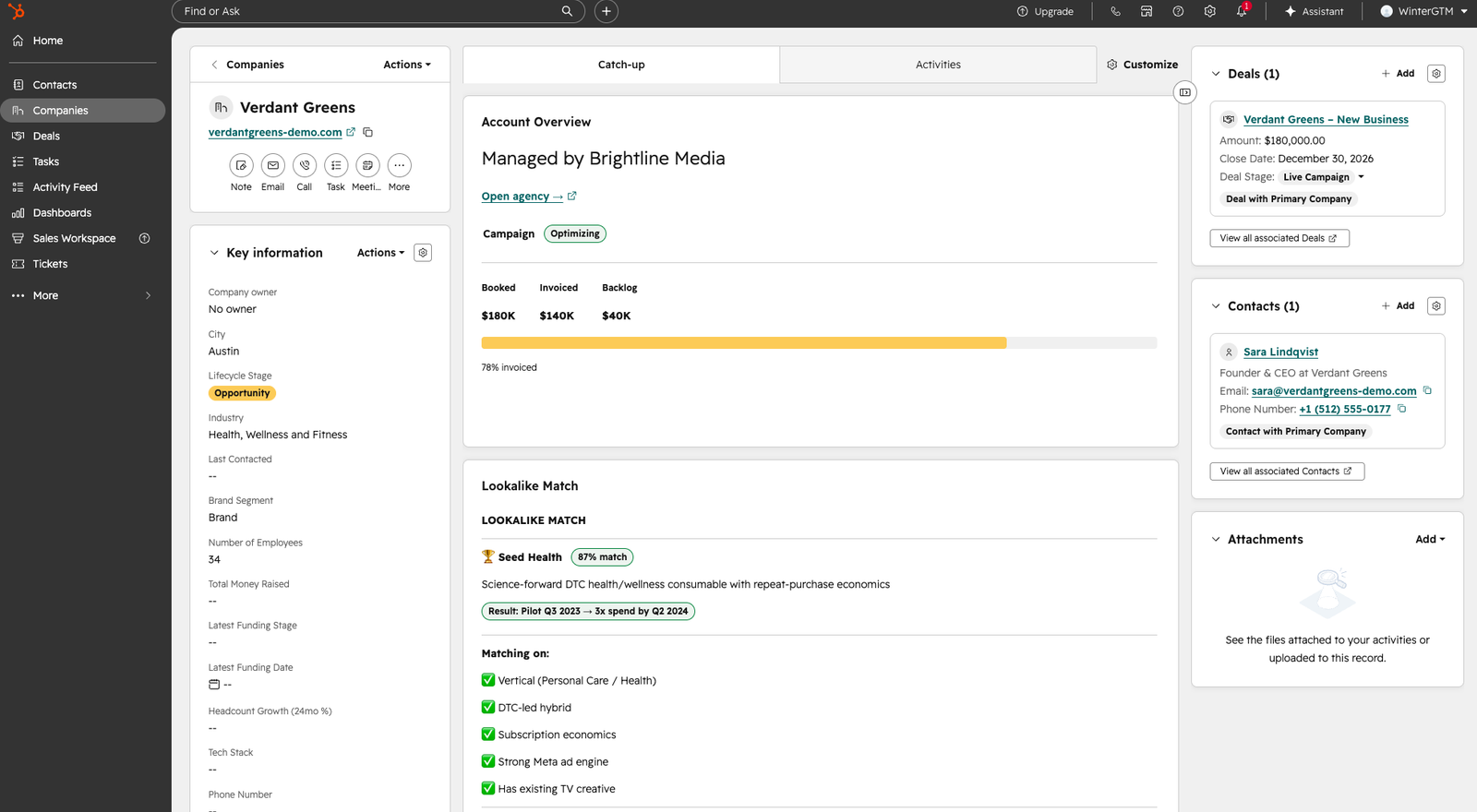
View an agency, and the card rolls up every brand beneath it. View a stand-alone brand, and it shows just that brand's own revenue and campaign. View an agency-managed brand, and it adds who manages it, with a one-click link back to the agency.

How I built it

A single React component reads brand_segment and branches: the agency face parses a rolled-up JSON of every linked brand; the brand face reads its own revenue fields, adding the managing agency when there is one. Everything is pulled live via the fetchCrmObjectProperties action.
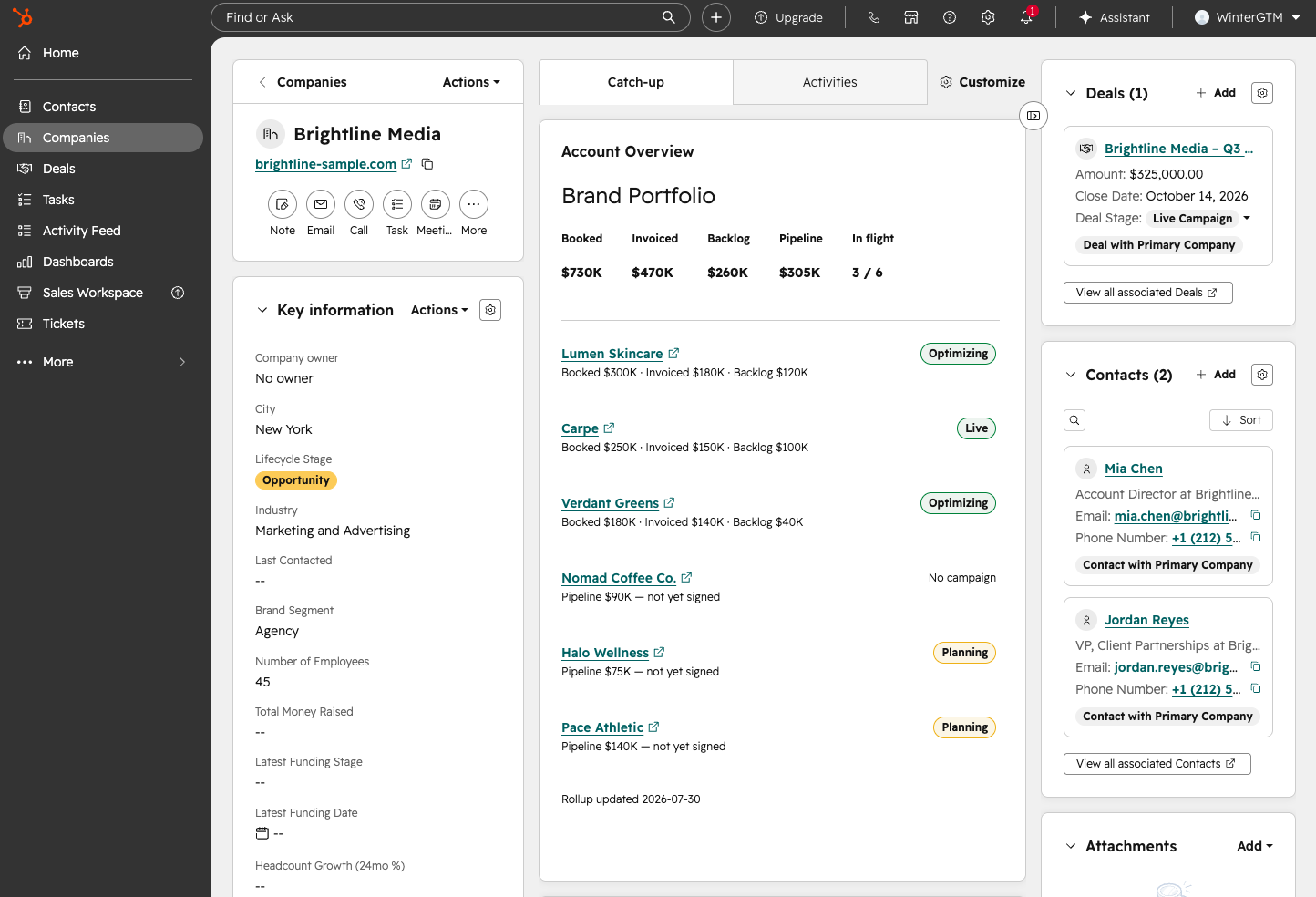
Agency record: the Account Overview card showing the full brand-portfolio rollup.
Save as assets/agency-portfolio.png
On an agency: the portfolio.
Brand record: the same card adapted, showing managing agency, campaign, and booked/backlog.
Save as assets/brand-card.png
On a brand: the snapshot.
10 · Live ICP scoring ⭐

Real-time ICP scoring, pulled from an external API, right in the record.

  • A second card sends the company to a live external service that scores its fit against a defined ideal-customer profile, by matching it to lookalike brands that have already won on TV.
  • The result is explainable: a fit score, the exact criteria it matched (vertical, DTC model, subscription economics, ad engine, existing TV creative), and comparable brands with real outcomes.
  • No middleware, no page reload: the CRM becomes the front end for a custom scoring engine.
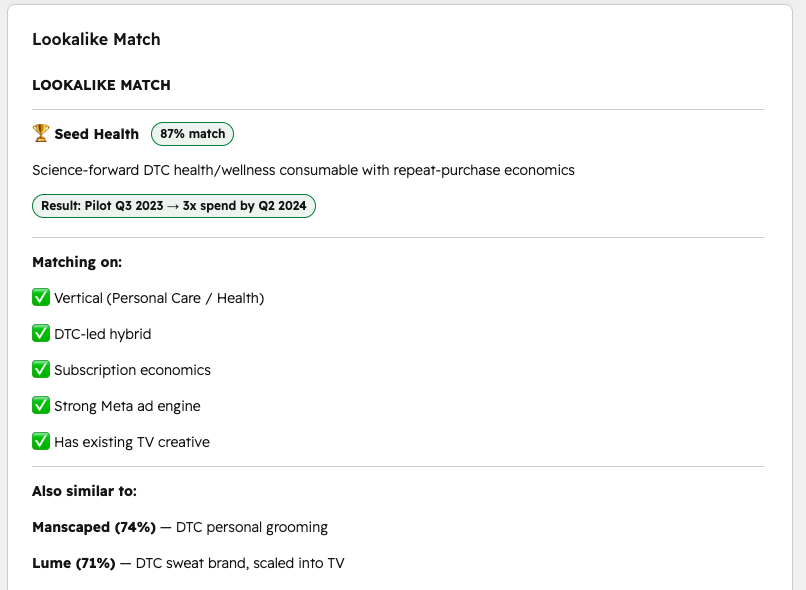
A custom card showing a live ICP fit analysis: a match score, the criteria it matched on, and comparable brands with proven outcomes.
Save as assets/live-card.png
The populated Lookalike Match card
The card scores ICP fit and surfaces comparable brands, live and in-record.
11 Β· Under the hood

No serverless? Talk to the API directly.

  • That scoring card has no backend of its own. Rather than add paid serverless, it calls the ICP service directly via hubspot.fetch.
  • The gotcha that cost an afternoon: the gateway strips custom headers and wants an object body.
  • Diagnosing an empty HTTP 400 vs a real API error is the difference between "broken" and "shipped."
the fix Β·
// hubspot.fetch STRIPS client headers and wants an
// OBJECT body; it serializes + sets Content-Type.
// A stringified body + manual header β†’ HTTP 400
// *before* the request reaches the API.

const kick = await hubspot.fetch(`${BASE}/qualify`, {
  method: 'POST',
  body: company,          // object, not JSON.stringify
});

// async job β†’ poll every 5s until it's done
for (let i = 0; i < 90; i++) {
  await wait(5000);
  const j = await get(`/result/${kick.job_id}`);
  if (j.status === 'done') { render(j); break; }
}
12 Β· The revenue model

Signed isn't the same as delivered.

A campaign is contracted up front, then delivered and invoiced in phases. The gap is backlog: committed but not yet earned.

Invoiced $180K
Backlog $120K
$300K booked60% delivered

A $300K contract, $180K delivered β†’ $120K still to deliver. "What we've sold" and "what we still owe" become two different, always‑current numbers, rolled up automatically per brand and per agency.

How I built it

Invoiced-to-date is a deal property; backlog is derived as booked βˆ’ invoiced in the rollup script (), so "sold" and "still owed" recompute on every sync, per brand and per agency, with no manual reconciliation.

13 Β· Automation

The reporting computes itself.

  • Rolling booked and backlog up an agency's brands (only signed deals, minus what's invoiced) is more than a native rollup can do.
  • So a scheduled script walks every brand, reads its deals and delivery tickets, aggregates, and writes the totals back as real fields the cards, columns, and reports all read.
  • One command refreshes the entire book of business; nobody rebuilds a report by hand.
# scheduled rollup: a lightweight "workflow"
SIGNED = {"Legal / IO", "Live Campaign",
          "Closed Won"}

for deal in brand_deals:
    if deal.stage in SIGNED:
        booked   += deal.amount
        invoiced += deal.invoiced_to_date
    elif deal.stage != "Closed Lost":
        pipeline += deal.amount

backlog = booked - invoiced
write_back(agency, booked, backlog, pipeline)
14 Β· Enrichment & onboarding

From a domain to a full record in one run.

HubSpot's own enrichment is a paid add-on that mostly fills in a company you already have. It doesn't hand you the buying committee. Apollo does both.

  • Apollo pulls verified firmographics (funding, tech stack, headcount) and the actual decision-makers, in one pull.
  • One script maps it to HubSpot: dedupe by domain, then create the company, contacts, and a Discovery-stage deal, fully wired.
  • Real data from day one, not an empty CRM to fill by hand.

Enriched by Apollo.io
# apollo JSON in β†’ mapped, deduped, connected record
org, people = load(apollo_org), load(apollo_people)

# reuse the company if the domain exists, else create
company = find_by_domain(org["domain"]) \
          or create_company(map_company(org))

for p in people:                 # decision-makers β†’ contacts
    c = create_contact(map_contact(p))
    associate(c, company)

deal = create_deal(company,      # Brands pipeline
                   stage="Discovery")
associate(deal, company)
15 Β· The operational layer

Rank every agency by booked, backlog, or live campaigns.

The rollups surface as sortable columns (brands, booked, backlog, campaigns live), so the whole book ranks itself by revenue.

How I built it

The rollup fields become sortable company columns, and I saved a full set of views (Agencies, Direct Brands, Agency-Managed, plus deal, ticket, and contact cuts), so every operational question is a saved view, not a rebuild.
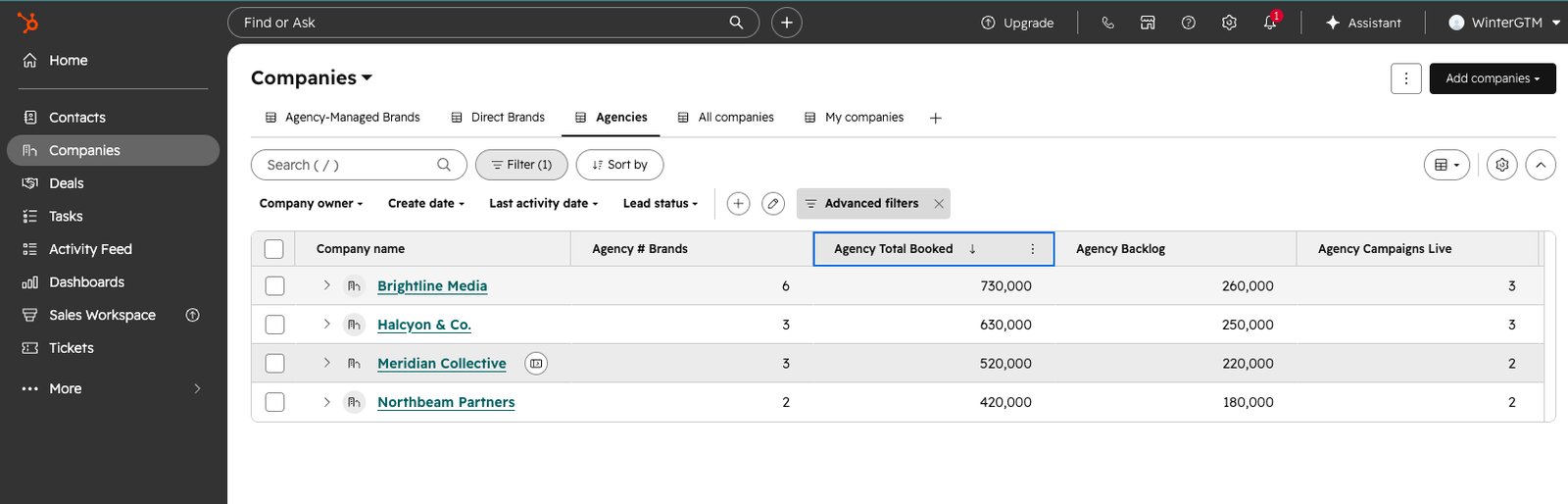
The Agencies list, sorted by total booked, with columns for brands, booked, backlog, and campaigns live.
Save as assets/book-of-business.png
Agencies ranked by revenue: the book of business, live.
16 Β· Outcomes

From a tangle to a self-running book of business.

Before
  • Agencies and brands in one flat list, indistinguishable.
  • A deal had to pick a side: the agency, or the brand.
  • No way to separate what's sold from what's delivered.
  • Who manages whom lived in people's heads.
  • Every report was a manual spreadsheet rebuild.
After
  • Every brand typed and linked under its agency.
  • Sale, relationship, campaign, and money each in their own home.
  • Booked, invoiced, and backlog are three live numbers.
  • Every relationship is a filterable field.
  • Reporting refreshes itself on a schedule.
17 Β· How it's built

The stack.

Data
HubSpot CRM: companies, deals, tickets; two custom pipelines; 30+ custom properties.
Interface
React UI Extensions (@hubspot/ui-extensions), deployed as a private app via the HubSpot projects CLI.
Live data
hubspot.fetch to an external scoring API: async polling, no serverless required.
Automation
Python + HubSpot REST API: scheduled rollup engine that replaces native workflows.
Enrichment
Apollo.io: verified firmographics and decision-makers, on demand.
Approach
Standard HubSpot objects, no paid add-ons, with a clean upgrade path into Pro / Enterprise features mapped throughout.
18 Β· What this demonstrates

Strategy, finance, platform, and code, end to end.

Strategy

Systems thinking

Naming the four layers before touching a single field.

Finance

Revenue architecture

Booked, invoiced, backlog, all modeled the way the business earns.

Platform

HubSpot depth

Objects, associations, pipelines, and custom UI extensions.

Build

Custom development

React cards, live-API integration, and automation in Python.

Judgment

Working in constraints

A lean design that avoids paid add-ons, with a clean upgrade path baked in.

Delivery

End to end

From a blank portal to a system a team can run on day one.

Let's architect yours

If your CRM can't tell you what you've sold versus what you still owe, that's a model problem, not a reporting problem.

Shane Winter Β· RevOps + GTM Engineer HubSpot Β· Salesforce Β· Clay shane@winterrevops.com
01 / 19
← β†’ or space to navigate